Tutorials - Simon Willison Data analysis with SQLite and Python
Notes
00:02 Introduction to PyCon Tutorial
- Largest conference attended in 3.5 years
- Tutorial on data analysis with SQLite and Python
- Handout available at: sqlite-tutorial-pycon-2023.readthedocs.io
- Volunteers Felix and Nick available for help
01:14 Tutorial Overview
- Topics covered:
- SQLite and Python from standard library
- Datasette - tool for data exploration, analysis, and publishing
- sqlite-utils library for productive SQLite work
- Publishing databases to the internet
- Datasette running in WebAssembly
- Advanced SQL topics
- 02:01: SQL approach - learning like a board game (pick up rules as you go)
02:30 Requirements & Setup
- First half: Only Python 3 needed
- Second half: Ability to pip install packages
- GitHub Codespaces as backup development environment
- 03:07: Codespaces benefit - throwaway environment if things break
05:37 What is SQLite?
- Fascinating piece of technology that doesn't get enough respect
- Named after stalactites and stalagmites (not because it's lightweight)
- 06:12: Key characteristics:
- Around for at least 20 years
- Embedded database (not server-based like Postgres/MySQL)
- C library with function calls to file on disk
- Screamingly fast - no network overhead
- 06:50: Built into Python since 2006
- 07:12: Library of Congress considers it archival quality
- 07:31: Database is a single file (data.db) that works on any platform
- 08:22: Maximum size is 2.8 terabytes (doubled from 1.4TB about a year ago)
- 08:45: Many small queries are efficient - 200 SQL queries = 200 function calls (not network round trips)
09:32 Getting Started - Downloading Example Database
- Example: content.db from datasette.io
- Contains news, plugins, and other data from official Datasette website
- 11:06: File is 17 megabytes
11: 11 Basic Python SQLite Usage
12:23 Working with Cursors
14:05 Creating Tables
16:02 Inserting Data
- GPT-4 used to write parser function (saved 1.5 minutes)
- 16:21: Example: Parsing PEP 20 (The Zen of Python by Tim Peters, 2004)
- 17:50: Using Parameterized Queries
- Use placeholders (?) to avoid SQL injection
- Pass values as tuple/list separately
- 18:26: Always parameterize queries when working with external data
- 19:17: Alternative: Named parameters with colon syntax (e.g.,
:pep,:title)
20: 23 Core SQL Operations
- INSERT: Adding data to tables
- UPDATE: Modifying existing rows
- 20:40: Example:
UPDATE peps SET author = :author WHERE id = :id
- 20:40: Example:
- DELETE: Removing rows
- 22:44: Example:
DELETE FROM peps WHERE id = ?
- 22:44: Example:
- 21:31: Transactions: Use
with db:context manager for automatic transaction handling - 23:02: 90% of data manipulation language covered
- 23:21: Most complexity is in SELECT statements
25:29 Introducing Datasette
26:51 Datasette Web Interface
- Provides interface to explore any SQLite database
- 27:04: Shows all tables in database
- 28:34: Repos table: All GitHub repositories in the Datasette project (158 total)
- 29:36: GitHub-to-sqlite tool - imports GitHub data into SQLite
- 30:01: Pattern: Everything in life can be in SQLite for querying/joining
- 30:26: genome-to-sqlite - import genome data, query eye color with SQL
30:39 Congressional Legislators Database
33:45 Exploring Data in Datasette
34:24 Foreign Keys & Relations
35:40 Faceting - Favorite Datasette Feature
- Count rows based on column values
- 35:56: Example: New York has 4,189 legislative terms (most of any state)
- 36:15: Facet by type: Representative vs Senator
- 36:22: Drill down - senators from Massachusetts
- 36:29: Massachusetts Senate: 38 Republican terms, 32 Democrat, 11 Whig
- 36:42: Faceting helps understand data at macro level
37:07 Query Builder Interface
38:35 Exporting Data
39:25 URL-Based API
41:37 Custom SQL Queries
43:18 Named Parameters in Queries
44:44 Data Journalism Use Case
45:38 SQL Query API
- JSON API that takes SQL as parameter
- 46:07: Send SQL queries through API endpoint
- 46:39: Sounds like SQL injection vulnerability
- 46:56: Safe because:
- Publishing entire databases intentionally
- Read-only databases
- 47:07: 1-second time limit on queries
- 47:38: Very productive for JavaScript development - "glue SQL queries together"
47:54 Core Datasette Features Summary
- Browse tables
- Filter and facet
- Export as JSON/CSV
- 48:14: Copyable plugin - export to LaTeX, GitHub markdown tables
48:49 Datasette Plugins
50:25 datasette-cluster-map Plugin
- First plugin ever written
- Installation:
datasette install datasette-cluster-map - 50:37: Same as
pip installbut ensures correct virtual environment - 50:56: Check plugins:
datasette plugins - 51:15: Automatically detects latitude/longitude columns and draws map
- 51:34: Example: Congressional offices map showing Pago Pago (American Samoa)
- 52:11: Learn new things about the world through demos
53:05 Exporting Data Options
- Export current page (100 records)
- 53:12: Stream all rows - exports all 45,000 rows to CSV
53:49 SQLite Primary Keys
55:19 Learning SQL with Datasette
56:28 Learn SQL Tutorial
- Covers: SELECT, FROM, WHERE, ORDER BY, LIMIT
- Named parameters
- 56:59: LIKE queries
- Joins
57:05 SQL Joins
57:42 Join Example - Executive Terms
59:04 Join Syntax
JOIN executives ON executive_terms.executive_id = executives.id- 59:17: Now returns name instead of just executive_id
- 59:30: SELECT * returns columns from both tables
- 59:48: Join structure: combine tables on matching criteria
- 60:18: Can nest multiple joins
- 60:23: This is an "inner join" (most basic kind)
60:36 Table Prefixes in Queries
- Include full table names for readability
- 60:54: Like avoiding
import *in Python - Makes it clear which table each column comes from
61:53 SQL as a Long-term Skill
62:49 ⭐ sqlite-utils Introduction
64:40 Manatee Data Example
66:02 Importing CSV to SQLite
- Command:
sqlite-utils insert manatees.db locations [file.csv] --csv -d - Structure: database file, table name, CSV file
- 66:21:
--csvflag indicates CSV data -dflag: Try to detect types (integers as integers, not strings)
66:35 CSV vs JSON for Data
67:57 User-Friendly SQLite Interfaces
69:19 Viewing Database Schema
69:56 Exploring Manatee Data
- 13,000 rows
- 70:12: Facet data by mortality
70:50 Querying from Command Line
71:40 Transform Command in sqlite-utils
72:53 How Transform Works Under the Hood
- Creates new table (locations_temp) in new format
- Copies old data to new table
- Drops old table
- Renames new table back to original name
73:10 Transform Operations
74:05 Map Visualization
75:09 Date Format Conversion
75:27 ⭐ sqlite-utils convert Command
- Convert values in columns to different formats
- 76:06: Takes Python expression as parameter
- 76:13: Converting rep_date, created_date, last_edited_date columns
- 76:20: Can put any Python expression
- 76:26:
r.parsedate()function - uses dateutil under the hood - 76:36: Converts any string to ISO formatted string
- 75:52: Result: ISO formatted dates (YYYY-MM-DD)
77:03 Recipe Namespace
78:09 When to Use Python vs SQL
79:47 Registering Custom Functions
80:24 ⭐ Database Normalization - Extract Command
- 80:33: Mortality column has duplicate data
- 80:40: Verified, Not Necropsied repeated thousands of times
- 80:47: Database normalization - don't duplicate same string thousands of times
- 81:06: Faceting shows decode and mortality have identical counts
- 81:16: Decode values: 1=human related, 4=watercraft, 8=perinatal
81:51 Extract Command Usage
sqlite-utils extract manatees.db locations DCODE MORTALITY \
  --rename MORTALITY name \
  --table mortality
sqlite-utils extract manatees.db locations decode mortality --rename mortality name- 82:05: Creates new "mortality" table
- 82:11: Two tables now: locations and mortality
- 82:25: Locations now has
mortality_idforeign key column - 82:43: Foreign key reference defined in schema
- 82:49: sqlite-utils extracted data, created new table, rewritten original table
- 83:01: No longer duplicating data - using foreign key reference
- 83:08: Faceting still works - Datasette smart enough to pull official name
83:28 Benefits of Extract Tool
84:21 Adding Foreign Keys to Existing Tables
- ❓ Question: Can you foreign key two CSV files?
- Yes, import both then use
add-foreign-keycommand
- Yes, import both then use
- 84:39:
sqlite-utils add-foreign-key mybooks.db books author_id authors id - 84:60: SQLite doesn't have native ability to add foreign keys to existing tables
- 85:10: sqlite-utils has patterns baked in for this
85:23 Break Time
- 10 minute break
- 85:30: Next: Create database of PEPs and publish to internet
- Then: Advanced SQL topics
- Reconvene at 3:05pm
1:25:43: Demo: Create a database and publish to internet
105:21 SQLite vs Pandas - Tool Preference
- 105:27: "When all you have is a hammer everything's a nail"
- When you have sqlite-utils, Python, Jupyter notebooks, and Datasette - everything becomes a SQLite problem
- 105:41: Not a heavy Pandas user - prefers SQL
- 105:53: Datasette is almost a competitor to Pandas
- 106:06: Many problems could be solved with either SQLite/Datasette or Pandas
- Tends to lean towards tools being built
106:11 Why Python with SQL?
- Python for manipulation and data cleaning layer
- 106:28: Tasks difficult in SQL: taking text files on disk and converting to format
- SQL for querying at the end
106:46 Publishing to the Internet
- 106:52: GitHub Codespaces frustration - private by default
- 107:04: Free development environment but not free public hosting
- 107:17: Datasette's entire reason: help people publish data
- 107:22: Get data into shareable format as easily as possible
- 107:29: Going to publish peps.db (10 megabyte database)
107:51 Publishing with Vercel
108:27 Vercel Authentication & Setup
109:15 Publishing Database to Vercel
- Command:
datasette publish vercel notebook/peps.db --project peps - 109:27: Uploads 10MB SQLite database to Vercel
- 109:34: Deploys full Datasette web application
- 109:41: Provides progress bar
- 109:47: Installing dependencies, running pip install
- 109:52: Generating build outputs
- Deploying to Washington DC
- Running checks on domains
- 109:59: Done! Available at peps-simonw.vercel.app
110:07 Published Database Features
- Database created earlier, complete with search engine
- Can search for "generators"
- 110:13: Running live on internet at peps-simonw.vercel.app
- 110:18: Can point custom domain names or assign aliases
- 110:31: About 30 seconds total (including software installation)
- 110:37: Database goes from local environment to public
110:42 JSON API
111:08 Vercel Platform Details
111:41 Datasette Creation Origin Story
- 111:47: This feature inspired creation of Datasette
- 111:53: Looking at Vercel (then called Zeit Now) before rebranding
- 112:00: Could this solve the newspaper problem?
- 112:05: Wanting good way to deploy structured data for people to use
- 112:12: Works really well
- 112:18: Deployed hundreds of applications to Vercel
- Cost: $20/month max for Vercel plan with hundreds of projects
- 112:24: Really powerful way of sharing data
112:32 Other Publishing Options
- 112:38: Datasette can publish to Google Cloud Run and Heroku out of the box
- 112:44: Heroku canceled free plan - less exciting now
- 112:50: Favorite: Fly.io
- Built plugin:
datasette-publish-fly - 112:56: Plugin system allows writing plugins for any hosting provider with good API
- 115:40: Datasette documentation has extensive coverage
113:12 Baked Data Pattern
113:40 Stateless Hosting Providers
- Vercel, Amazon Lambda, Google Cloud Run designed as stateless
- 113:46: Will run code but if you want database - need to pay extra
- Amazon RDS or Google database services
- 113:54: Hosting code that doesn't write to disk is really easy
- 114:00: Wrap container, launch for new request, shut down, scale with multiple copies
- 114:06: Very easy in 2023 to host stateless application
- 114:12: Stateful applications with disk access and backups - expensive and complicated
114:20 Read-Only Data Realization
- Big realization: only care about read-only data
- 114:25: None of these accepting writes at all
- 114:31: If read-only, can "abuse" free hosting providers
- 114:38: SQLite built-in, runs in read-only mode
- 114:44: "Abusing" tools meant for simple applications
- 114:50: Stick 5MB of binary SQLite data in container - it just works
- 114:55: Called "baked data pattern" - baking data into application
- 115:02: Perfect example of why this pattern is interesting
115:08 Redeployment Strategy
115:47 Datasette Lite - WebAssembly Introduction
- 115:53: Experiment from last year, started as a joke
- 115:58: Pyodide project - runs Python entirely in browser
- 116:05: Compiles Python interpreter to WebAssembly
- JupyterLite: "Most incredible piece of engineering"
- 116:12: Full Jupyter notebook stack in browser
- 116:25: Python via WebAssembly, all of Jupyter, pandas, numpy, matplotlib
- 116:37: Thought: wouldn't it be interesting if Datasette could run in browser?
116:44 Datasette Architecture
- 116:51: Very opinionated - NOT a JavaScript application
- Very little JavaScript in Datasette
- Some syntax highlighting
- 116:57: Clicking sort reloads whole page
- 117:03: Boring old HTML - simpler, faster to load, better accessibility
- 117:08: Funny to run pure server-side web application in browser using WebAssembly
117:14 Datasette Lite Demo
- Built Datasette Lite
- 117:26: Open browser network tab to see what it does
- 117:32: Navigate to lite.datasette.io
- 117:38: Downloads:
- 2MB pyodide.asm.js (Python interpreter compiled to WebAssembly)
- 5MB pyodide.asm.data (Python standard library compiled to WebAssembly)
- 117:57: Downloads those files
- 118:03: Hits Python Package Index and runs pip install of Datasette
- 118:21: Pip install runs in browser, pulls latest Datasette from PyPI
- 118:27: Full Datasette with all features - faceting, SQL queries
118:35 Datasette Lite URLs
- 118:41: Fragment hash in URL
- Everything after that is regular Datasette URLs
- 118:49: "Built as a bit of a joke"
- 118:55: Thought nobody would use it - loads 10MB before becoming usable
- 119:00: Forgot average React app is ~5MB
- 119:08: Waiting for few extra megabytes for full Python interpreter not restrictive
119:13 Genuinely Serverless
119:43 Loading External Files
120:09 FiveThirtyEight Data Example
120:43 Loading CSV into Datasette Lite
121:15 Sharing Datasette Lite Links
- Send link to anyone else in the world
- 121:21: Their browser installs Datasette and Python, gets interpreter running, downloads CSV, loads in SQLite
- All "bizarre crazy junk" in about 15 seconds
- Then can interact with data same way
121:27 Workflow Simplification
121:53 CORS and GitHub
122:32 Attribution Question
122:58 Red Pajama Training Data Example
123:37 Clever Investigation Approach
- Released as text file with 2,000 URLs
- 123:44: Each URL = 1 gigabyte blob
- Want all data? Run wget and download all 2000 URLs = 2.7TB disk space
- 123:56: Instead: HTTP HEAD request against each URL
- Get back just size in bytes
- 124:04: Run in 15 seconds - churn through all 2000, get sizes
- 124:09: Now have URLs and sizes
124:19 Creating Analysis Dataset
124:58 Analyzing with Datasette Lite
- Have the gist
- Go to Datasette Lite
- Feed in URL
- 125:06: Now have a table
- Very quick route: list of files → files + sizes → JSON gist → interactive interface
- 125:12: Can start playing with it
- 125:18: Facet by top_folder
- 125:23: Wikipedia was single file (all in one Wikipedia file)
- C4 and Common Crawl most represented
- 125:31: From raw data to telling stories and understanding data in few steps as possible
125:44 Datasette Lite as Default Solution
126:10 Plugin Support in Datasette Lite
- Datasette Lite supports plugins
- 126:16: Construct URL with
?install=and plugin name - 126:23: Can do multiple times:
install=this&install=that - 126:30: On startup will pip install plugins
- Now have new features (example: copyable plugin for LaTeX)
- 126:38: Can use directly with
install=datasette-copyablein URL - 126:52: Further reading documentation includes blog entry on how plugin support works
- 126:58: Ecosystem benefit - plugins written for Datasette work in Datasette Lite
- 127:04: Multiplies ecosystem value
127:24 Browser Storage Limits
- Question: How much data can your browser hold?
- 127:29: Haven't tested upper limits yet - thinks it's gigabytes
- 127:42: Fascinated by large language models (ChatGPT)
- 127:47: WebLLM - runs ChatGPT-style model entirely in browser
- 127:53: Uses WebAssembly and WebGPU (new graphics card API in Chrome)
- 128:00: Loaded 2GB model file into browser - it worked
- 128:07: Believes 2GB SQLite file will work fine as well
- 128:14: Laptop has 64GB RAM - 2GB browser tab isn't a big deal
- 128:21: Download speed is bigger problem
- 128:26: Home internet loads 2GB in 1-2 minutes - feasible
- 128:31: Surprising how much you can get done in browser
128:37 Advanced SQL Introduction
129:08 SQL Aggregations
129:30 Example: Presidential Terms by Party
- Looking at executive terms table
- 129:36: For each party, how many presidential terms?
- Democrat Party: 5
- Democratic party: 21
- 129:43: Democratic-Republican: 7 (never heard of)
- 129:49: Key pattern: GROUP BY at end to group rows
- 129:55: Groups into chunks matching on that column
- 130:01: Can do aggregate functions like
COUNT(*)across individual groups
130:06 Aggregate Functions
- COUNT(*) most common
- 130:12: Other commonly used:
- MAX for maximum value
- MIN for minimum value
- SUM to add things up
130:26 Training Data Example with Aggregation
- Showing Datasette Lite example
- 130:38: Escaping bug - ampersands where there should be "and"
- 130:45: Running aggregation across top_folders column
- 130:52: Summing total gigabytes as total_GB
- 130:57: Wikipedia: 111GB in one file
- 131:02: Stack Exchange: 74GB in one file
- GitHub: 212GB across 98 files
- 131:07: Useful things to calculate
- 131:14: Worth exploring aggregates
131:19 Subqueries - More Fun Example
131:47 Subquery Example
132:12 Breaking Down Subquery Example
- Run as separate steps first
SELECT repo FROM plugin_repos- 132:18: Get back list of repository names (strings)
- 132:24:
SELECT id FROM repos WHERE full_name IN ... - 132:31: full_name turned into ID
- 132:42: Want IDs for things where name is in that other table
- 132:47: Could normally do with JOIN
- 132:53: Joins across multiple tables quite difficult to follow
- 132:59: Anytime we get to a join, have to think about it
- 133:06: Using nested subqueries can actually follow easier
- Can understand step by step: name of repos → list of IDs → list of those
133:14 Full Subquery Example
SELECT url FROM releases WHERE repo IN ...- 133:21: Getting back URLs to releases
- 133:27: Most recent release (ordered by created)
- 133:33: Most recent releases of repositories in list of plugin repositories
- 133:39: Datasette website has two types: plugins and tools
- 133:44: Switch to tool_repos: swarm-to-sqlite, apple-notes-to-sqlite, db-to-sqlite
- 133:51: Same thing from plugin_repos: gets latest releases of plugins
- 133:59: Bit convoluted, probably should have broken down simpler
134:33 Scalar Subqueries - Even Cooler
- Another type of subquery
- 134:44: For each repository, want:
- Name of repository
- 134:50: URL of latest release in that repository
- 134:55: Latest releases in other table
- 135:02: In SELECT clause itself, can run complicated query
- Has to be LIMIT 1
- 135:23: Key idea: for each repository listed, running second SQL query inside loop
- 135:29: Fetch additional related data
135:35 Query Efficiency Considerations
- Instinct: looks like terrible idea
- 135:42: Pulling 200 results, then doing another 200 SQL queries
- 135:47: SQLite optimizes that to certain extent
- 135:53: Database table with 200 rows - nothing can take longer than fraction of millisecond
- 135:58: Often deliberately write very inefficient queries
- For size of data working with, honestly doesn't matter
136:09 Big Data and Inefficient Queries
- Worked for larger company with Hive, Presto, Big Data Warehouse things
- 136:14: Fun thing: can write very inefficient SQL against them too
- 136:21: Whole reason for existing: break complex queries into map-reduces
- 136:26: Inefficient queries work well against Big Data warehouses
- 136:33: Would never do this in production for high-traffic web application
- 136:40: For this data size, can do lots with "laughably inefficient SQL loops"
136:47 Experimenting with Subqueries
- Often default to weird subqueries to try them out
- 136:54: See what works and what doesn't
- Always end up learning interesting new patterns
- One more super fun example coming up
137:08 Common Table Expressions (CTEs)
- All-time favorite SQL function/feature
- 137:13: Terrible name - not enough people aware of it
- Called CTE (Common Table Expressions)
- 137:22: SQL's answer to abstraction
- Like Python: duplicate code logic → put in function with nice name
- 137:29: Helps maintainability and productivity
- 137:34: SQL queries notorious for getting long
- 137:40: People have 500-line SQL queries left by previous employee
- Nobody knows how it works, everyone terrified to touch it
137:52 Making SQL More Effective
138:12 CTE Example: Presidents Who Were VPs
- Question: How many presidents originally served as vice presidents?
- 138:25: Using executive_terms table - mixes two types of office
- Has presidents and vice presidents
- 138:32: Create table called "presidents"
- 138:37: Then SELECT * FROM presidents
- 138:43: Could do without CTE, get same result
- 138:48: Illustrating: giving this SELECT query (doing join and WHERE clause) the alias "presidents"
- 138:55: Quite complicated query
- 139:01: Later can select from it
139:07 Adding Multiple CTEs
- Can add another:
vice_presidents AS ... - Can SELECT * FROM vice_presidents
- 139:21: Or SELECT * FROM presidents
- Now have two virtual tables
- 139:27: Can solve problem: SELECT DISTINCT name from presidents WHERE name appears in list of vice_presidents
- 139:32: Get back 15 rows
- 139:38: Each is president who was previously vice president
139:44 Data Quality Note
140:02 Benefits of CTEs
- Using technique: take very complicated queries
- 140:08: Turn into something where you can understand what's happening
- 140:14: "I love this"
- 140:21: Got more ambitious with problems solved in SQL vs Python once figured out how to use
- Allows taking complex logic and abstracting to point where you can reason about it
- 140:27: Then do joins between them, unions, etc.
- 140:33: If don't use CTEs, very strongly recommend exploring them
140:43 CTEs vs Self Joins
141:08 JSON in SQLite
- 141:13: Another feature SQLite has baked in - incredibly valuable
- 141:19: Functions that know how to deal with JSON objects stored in database
- 141:25: Postgres has JSON type (JSON and JSONB) - optimized
- 141:31: SQLite doesn't - tells you to store JSON in text column
- If you store JSON in text columns, can do interesting things with it
- 141:38: More importantly: SQLite can output JSON
- 141:44: Can use functions to build up JSON values to return
141:50 JSON Aggregation Example
- Problem: get back list of all legislators
- 141:57: For each legislator, fetch all terms they served
- All in one go
- 142:04: Normally: write Python code or pull back duplicate versions
- Many ways to do this
- 142:17: Neat to say: want single row per legislator
- 142:22: In one column should be JSON list of objects from other table
142:33 JSON Query Structure
142:50 How It Works
143:23 Duplicate Data Example
- Actual data full of dupes
- 143:28: Watkins Abbott represented 13 times
- Watkins Abbott had 13 terms in Congress
- 143:36: First step: GROUP BY legislators.id to dedupe
- 143:44: Do COUNT(*) - gives back ID, name, and number of terms
- 143:52: 13, 4, 3, 5, 1, 1, 5... (limited to 10 rows)
- Get back all legislators with all counts
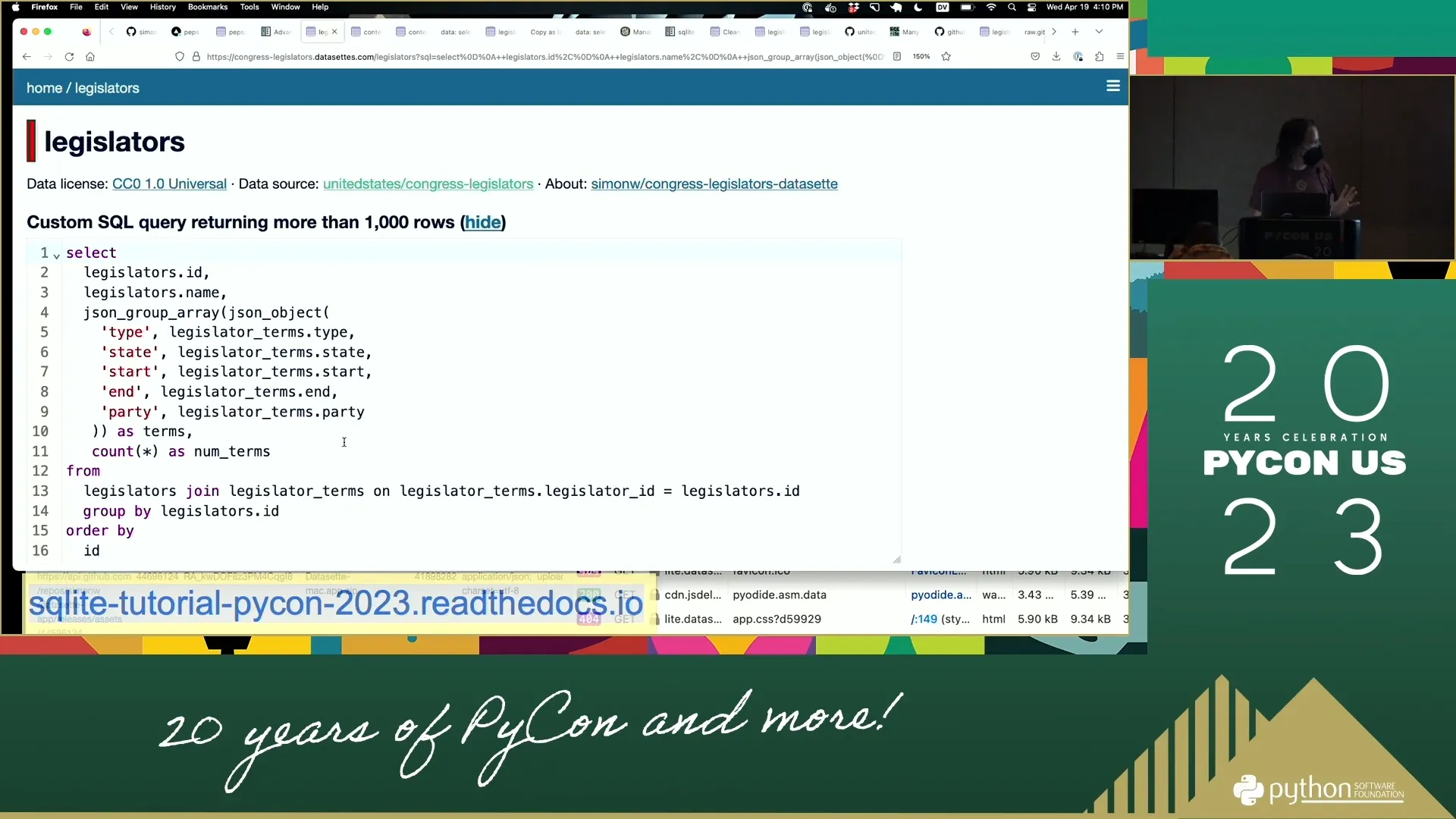
144:03 JSON_GROUP_ARRAY Magic
- Real magic: adding aggregation called
json_group_array - 144:09: For every duplicate chunk of rows
- 144:14: Build array that joins them together
- 144:20: In array: put JSON object
- 144:26: JSON object has labels and columns (type, state, start, end, party)
- 144:31: Can see in output: type, state, start, end, party in JSON objects
144:37 Common Web Development Problem
 2:25:01
 - Problem solving: always frustrating in web app development
- 144:42: Want to pull back all blog entries
- 144:48: For each one, list of tags on that blog entry
- Don't want multiple SQL queries
- 144:54: Once figure out JSON aggregations
- 145:00: Can solve "most frustrating problem in web development"
- 145:05: SQL query does all that fetching
145:10 Article Reference
- Wrote extensively about this
- Article: "Returning related rows in a single query using JSON"
- 145:16: Shows how to do same thing in Postgres
145:23 Postgres JSON Syntax
146:05 Window Functions - Final Advanced Feature
146:53 Window Function Example Problem
147:31 Building the Window Function Query
148:07 Adding Rank Column
- Going to add a rank
- 148:13: To select just three most recent, need indication
- 148:20: Incrementing integer for which release that was for those projects
- 148:27: Adding "little magic piece of syntax"
- SQL calls this window function
- 148:34: Feature added to SQLite maybe 3 years ago, inspired by Postgres implementation
148:40 How Window Functions Work
- For each release, create partition
- 148:46: Unique for each repository ID
- Ordered by created date on releases in descending order
- 148:52: As "rel_rank"
- Hard to see what that means from syntax
- 148:58: Look at output - added rel_rank column at end
- 149:04: Keeps going up for all of Datasette's releases (had 125)
- 149:12: Switch to csv-to-sqlite - only had 13 releases
- Goes 1, 2, 3, 4, 5 up to 13
- 149:18: datasette-cluster-map had 1-12 releases
149:23 Filtering on Rank
- 149:29: In single result, have something else to filter on
- 149:36: "I just want the top three"
- 149:47: Can say
SELECT * FROM cte WHERE rel_rank <= 3 - 150:06: Less than or equal to 3
- 150:13: Almost solved problem
- For each repository, show three most recent
- 150:19: For Datasette: 3 rows (versions 6.4.2, 6.4.1, 6.4)
- 150:24: csv-to-sqlite: 3 rows, cluster-map: 3 rows
- 150:29: dbf-to-sqlite only ever had 1 release - shows up once
- 150:35: Most others had at least 3
- datasette-cors: another with single release
- 150:41: This is almost what we need
150:49 Final Step: Adding JSON Aggregation
- Taking advantage of Common Table Expression
- 151:01: Adding back json_group_array with json_object
- That worked
- 151:08: For Datasette repo: 125 releases total
- Only 3 we care about in recent_releases
- 151:14: Those 3 showing up with ID and name of creator
- 151:21: Quite complicated query - getting quite a lot done
- 151:28: Combining CTE + json_group_array + window functions
- 151:35: Pretty sophisticated result
- 151:41: If wanted to build custom application showing summarized data - most work done in this one SQL query
151:46 JSON Aggregation Performance Question
- Question: What's computational cost of doing JSON aggregation in SQLite?
- 152:00: What's overhead of JSON construction in SQLite vs Python?
- 152:08: Haven't measured it - hunch is SQLite's faster
- 152:14: Everything in SQLite is C - incredibly well optimized
- 152:19: Benchmarking they're doing is absolutely extraordinary
- 152:25: Has benchmarked: JSON functions can crunch through gigabytes of data
- 152:32: Astonishingly fast at processing things
152:40 Paul Ford Quote on JSON
- Quote from Paul Ford dropped into section
- 152:46: "We save the text and when you retrieve it we parse the JSON at 700 megabytes a second"
- 152:51: "You can do path queries against it, please stop overthinking it - this is a filing cabinet"
- 152:57: Paul Ford's trick: gets JSON from somewhere
- Literally loads into SQLite table with one row per object with blob of JSON
- 153:04: Uses SQLite's built-in JSON features to extract bits, convert things
- 153:11: Often saves results to new database table
- Does all data processing with JSON functions inside SQLite itself
- 153:19: "I'm not quite there yet - haven't embraced it to quite that extent"
153:24 JSON Performance Benefits
- Phenomenally performant way of working with data
- 153:32: Most data these days comes in JSON shape
- Database engine that can do JSON really well - SQLite does
- 153:37: Find yourself leaning on that more and more
- 153:44: Always try to get things into relational table eventually (for faceting, filtering)
- 153:50: Lot you can get done just using blobs of JSON with fast C library
153:57 Fun Demos - Personal Projects
- Running close to time
- 154:03: Going to show fun demos - things built with Datasette
- "Chance for me to show off some of my websites"
154:09 Niche Museums Website
- Website for main hobby outside of technology
- 154:16: "I basically collect tiny museums"
- 154:22: Goal: whenever in new city, never been to Salt Lake City before
- Very interesting tiny museums around here
- 154:30: Try to find smallest museums and go to those first
- 154:36: Really tiny museum - doesn't matter what it's about
- Chances are person who collected stuff is there running museum
- 154:42: Get to have conversation with somebody who collects evidence of:
- Bigfoot
- Pez dispensers
- Little devil statues
- 154:48: "Super super rewarding"
154:54 Niche Museums Site Features
- Website: where all tiny museums found and visited go
- Can say "use my location"
- 155:00: Shows Donna Memorial State Park Visitor Center 450 miles away
- Closest visited to here
- 155:06: "Clearly not explored Utah and Colorado at all yet"
- This is just Datasette
- 155:12: Same Datasette web application seen earlier
- 155:18: Datasette lets you use custom templates
- Custom template for home page makes it look like website about museums
- 155:24: Custom template knows how to put things on map
- 155:30: Search feature is just another canned query
- Can tell because at nichemuseums.com/browse - it's Datasette
- 155:37: This is the website - there's the museums table
- Deployed on Vercel, costs nothing to run
- 155:45: Has plugins
- Every time new museum added, deploys new version of site - works fine
155:50 RSS Feed via SQL
- Website has RSS feed
- 155:56: Click there - get XML back
- Can subscribe to in feed reader
- 156:02: Actually defined using SQL query
- Query called "browse_feed"
- 156:07: Giant monstrosity of SQL query
- Using json_each and coalesce
- 156:13: Output of query: table with columns atom_id, atom_title, atom_updated
- 156:20: Datasette plugin called datasette-atom
- Only fires when table has these columns
- 156:25: Adds .atom extension, turns into XML
156:31 Other Output Plugins
- Few other plugins along those lines
- datasette-ics: can output subscribable ICS calendar files
- 156:36: Kind of fun
156:42 SQL as Integration Language
- Effectively using SQL as integration language
- 156:48: As developers, spend so much time getting data in one format and transforming to another
- 156:55: SQL's really good at that:
SELECT something AS atom_id, something AS atom_link - Transforms into that other format
- 157:02: If have plugins that know how to output things in different shapes
- Can pipe it all together
- 157:08: Out-of-the-box engine for reformatting data into different formats
- Something played with a bunch - thinks is really neat
157:20 Blog Project - Combining Everything
- Project illustrates what happens when you pull all this stuff together
- 157:26: Has a blog - running for 20 years
- 157:32: Been Django app for most of its life - Django and Postgres
- Runs on Heroku
- 157:38: Works - got Django admin, love those features
- These days likes to do things with SQLite and Datasette
- 157:45: Has copy of blog running at datasette.simonwillison.net
- "My blog as a SQLite database"
157:51 GitHub Actions Automation
- How it works: GitHub action script running
- 157:59: "26 star slash two - can anyone remember what that means?"
- 158:05: Every two hours
- Every two hours grabs backup of database from Heroku as Postgres dump
- 158:11: Converts to SQLite database
- 158:18: Gets those tables
- 158:24: Redacts password column - don't want that out there
- Runs few transforms to drop tables
- 158:31: At end runs
datasette publish - 158:38: To Cloud Run simonwillisonblog.db
- 158:44: With bunch of extra options, installs plugins
- 158:50: Every two hours latest version of blog gets published to Datasette instance
- 158:57: Can run SQL against all stuff, run queries and searches
- All Datasette goodness available
159:02 Substack Newsletter Automation
- Wanted to start Substack newsletter
- 159:07: For people who only ever use email to subscribe to blog
- 159:13: Didn't want to do any extra work - already putting stuff on blog
- Wanted simplest possible way to get blog content into newsletter format
- 159:19: Substack do NOT give you API
- 159:26: Give you rich text editor to write content in
- Do not give anything to help automate process
- 159:32: But you can copy and paste things into Substack editor
159:39 Observable Notebook Tool
- Rich text editor - can do bold, links, headings, images
- 159:49: Built tool using Observable notebook
- Called "blog-to-newsletter"
- 159:56: Giant bundle of JavaScript hitting Datasette API on blog
- Fetches back all sorts of different bits of content
- 160:02: "Terrifying SQL query in here somewhere"
- 160:10: SQL query that reads from 5 different tables
- Glues things together, sorts by, collect
- 160:16: All the CTE tricks
160:24 Newsletter Generation Process
- Based on running that, get table of data
- Has titles, URLs, different types of content
- 160:30: Bit of JavaScript at top glues it together into markdown
- Actually HTML
- 160:36: Generates HTML, previews HTML
- 160:42: At very top: big gray "Copy" button
- Click copy, go to Substack, hit paste
- 160:50: "That's my newsletter, I'm done"
- 160:56: Put that title in the title at top, add subheading, click Send
- 161:03: Sending newsletter once or twice a week takes about 1.5 minutes end to end
161:09 Technology Stack Summary
- 161:16: Blog in Django
- GitHub Actions pulling from Postgres and converting to SQLite
- 161:22: Publish to Google Cloud Run
- Run JavaScript in Observable to pull it all together
- 161:28: "It kind of just works" once one side-pieces those bits together
- 161:33: Thing likes about Observable notebooks: don't have to commit code to GitHub or open text editor
- 161:40: All hard work done directly in notebook interface
- 161:47: "Kind of cool" - nice illustration of projects you can do with all these components together
161:53 Q&A Session
- Only three minutes left
- Covered everything wanted to cover
- Three minutes of questions
162:20 Question: Materialized Views
- Question about materializing some views (e.g., "here's just the final third versions")
- 162:35: Didn't get into today: Datasette supports SQL views
- 162:42: SQLite supports views
- 162:49: Example: "recent_releases" view
- Does join between releases and repos table
- 162:54: Bunch of stuff played around with earlier
- 163:00: Because defined as view, Datasette treats it like another table
- Same interface - can facet by topics
- 163:06: Order by date, get things out as JSON
- 163:12: Behaves exactly like table except defined as extra SQL feature
- 163:18: "Super - something I find myself doing a lot"
- 163:24: Get bunch of raw data in normalized form, use views to create denormalized convenience layers
- 163:30: Can get that out as JSON as well
- If want JSON API for very specific shape of data - quickest way is define view and do it that way
163:57 Question: SQLAlchemy vs Building Own Abstraction
- Question: "If I don't want to build database abstraction layer, what about using SQLAlchemy?"
- 164:03: Good question
- Never quite gelled with SQLAlchemy
- 164:08: SQLAlchemy is big and complicated
- 164:13: With Datasette, trying to minimize dependencies
- 164:19: Biggest dependency for Datasette: Jinja templating language
- Feels has proved itself over many years
- 164:24: SQLAlchemy has proved itself as well - wouldn't be mistake to lock into SQLAlchemy
- 164:31: Worried about dependencies with backwards incompatible changes next year
- 164:38: Could be SQLAlchemy would help solve database abstraction problem well
- 164:45: Hunch: Datasette doesn't have many bits that would differ between databases
- 164:51: Mainly the way table page works - at least quite isolated
- 164:56: Refactoring that code at moment
- Thinking maybe pluggable database backends wouldn't be as difficult as initially thought
- 165:02: If do pluggable database backends, first two: DuckDB and Postgres
- 165:08: If can do those two - 90% of data problems in world fit into SQLite, DuckDB, or Postgres
165:18 Closing Remarks
- At time
- 165:24: "Thank you all very much for coming along"
- Will be hanging around for another 15 minutes
- 165:31: Happy to talk about stuff more
- Handout will stay available forever
- Will probably update it, turn bits into more official Datasette tutorials
- 165:37: "Super keen on feedback on this stuff"
- 165:43: Anything that didn't make sense, could be easier, ideas for future projects
- "I want to hear all of them"
- Here for rest of PyCon
- "Thank you very much"
Tutorials - Simon Willison Data analysis with SQLite and Python
Interactive graph
On this page
Notes
00:02 Introduction to PyCon Tutorial
01:14 Tutorial Overview
02:30 Requirements & Setup
05:37 What is SQLite?
09:32 Getting Started - Downloading Example Database
11: 11 Basic Python SQLite Usage
12:23 Working with Cursors
14:05 Creating Tables
16:02 Inserting Data
20: 23 Core SQL Operations
25:29 Introducing Datasette
26:51 Datasette Web Interface
30:39 Congressional Legislators Database
33:45 Exploring Data in Datasette
34:24 Foreign Keys & Relations
35:40 Faceting - Favorite Datasette Feature
37:07 Query Builder Interface
38:35 Exporting Data
39:25 URL-Based API
41:37 Custom SQL Queries
43:18 Named Parameters in Queries
44:44 Data Journalism Use Case
45:38 SQL Query API
47:54 Core Datasette Features Summary
48:49 Datasette Plugins
50:25 datasette-cluster-map Plugin
53:05 Exporting Data Options
53:49 SQLite Primary Keys
55:19 Learning SQL with Datasette
56:28 Learn SQL Tutorial
57:05 SQL Joins
57:42 Join Example - Executive Terms
59:04 Join Syntax
60:36 Table Prefixes in Queries
61:53 SQL as a Long-term Skill
62:49 ⭐ sqlite-utils Introduction
64:40 Manatee Data Example
66:02 Importing CSV to SQLite
66:35 CSV vs JSON for Data
67:57 User-Friendly SQLite Interfaces
69:19 Viewing Database Schema
69:56 Exploring Manatee Data
70:50 Querying from Command Line
71:40 Transform Command in sqlite-utils
72:53 How Transform Works Under the Hood
73:10 Transform Operations
74:05 Map Visualization
75:09 Date Format Conversion
75:27 ⭐ sqlite-utils convert Command
77:03 Recipe Namespace
78:09 When to Use Python vs SQL
79:47 Registering Custom Functions
80:24 ⭐ Database Normalization - Extract Command
81:51 Extract Command Usage
83:28 Benefits of Extract Tool
84:21 Adding Foreign Keys to Existing Tables
85:23 Break Time
1:25:43: Demo: Create a database and publish to internet
105:21 SQLite vs Pandas - Tool Preference
106:11 Why Python with SQL?
106:46 Publishing to the Internet
107:51 Publishing with Vercel
108:27 Vercel Authentication & Setup
109:15 Publishing Database to Vercel
110:07 Published Database Features
110:42 JSON API
111:08 Vercel Platform Details
111:41 Datasette Creation Origin Story
112:32 Other Publishing Options
113:12 Baked Data Pattern
113:40 Stateless Hosting Providers
114:20 Read-Only Data Realization
115:08 Redeployment Strategy
115:47 Datasette Lite - WebAssembly Introduction
116:44 Datasette Architecture
117:14 Datasette Lite Demo
118:35 Datasette Lite URLs
119:13 Genuinely Serverless
119:43 Loading External Files
120:09 FiveThirtyEight Data Example
120:43 Loading CSV into Datasette Lite
121:15 Sharing Datasette Lite Links
121:27 Workflow Simplification
121:53 CORS and GitHub
122:32 Attribution Question
122:58 Red Pajama Training Data Example
123:37 Clever Investigation Approach
124:19 Creating Analysis Dataset
124:58 Analyzing with Datasette Lite
125:44 Datasette Lite as Default Solution
126:10 Plugin Support in Datasette Lite
127:24 Browser Storage Limits
128:37 Advanced SQL Introduction
129:08 SQL Aggregations
129:30 Example: Presidential Terms by Party
130:06 Aggregate Functions
130:26 Training Data Example with Aggregation
131:19 Subqueries - More Fun Example
131:47 Subquery Example
132:12 Breaking Down Subquery Example
133:14 Full Subquery Example
134:33 Scalar Subqueries - Even Cooler
135:35 Query Efficiency Considerations
136:09 Big Data and Inefficient Queries
136:47 Experimenting with Subqueries
137:08 Common Table Expressions (CTEs)
137:52 Making SQL More Effective
138:12 CTE Example: Presidents Who Were VPs
139:07 Adding Multiple CTEs
139:44 Data Quality Note
140:02 Benefits of CTEs
140:43 CTEs vs Self Joins
141:08 JSON in SQLite
141:50 JSON Aggregation Example
142:33 JSON Query Structure
142:50 How It Works
143:23 Duplicate Data Example
144:03 JSON_GROUP_ARRAY Magic
144:37 Common Web Development Problem
145:10 Article Reference
145:23 Postgres JSON Syntax
146:05 Window Functions - Final Advanced Feature
146:53 Window Function Example Problem
147:31 Building the Window Function Query
148:07 Adding Rank Column
148:40 How Window Functions Work
149:23 Filtering on Rank
150:49 Final Step: Adding JSON Aggregation
151:46 JSON Aggregation Performance Question
152:40 Paul Ford Quote on JSON
153:24 JSON Performance Benefits
153:57 Fun Demos - Personal Projects
154:09 Niche Museums Website
154:54 Niche Museums Site Features
155:50 RSS Feed via SQL
156:31 Other Output Plugins
156:42 SQL as Integration Language
157:20 Blog Project - Combining Everything
157:51 GitHub Actions Automation
159:02 Substack Newsletter Automation
159:39 Observable Notebook Tool
160:24 Newsletter Generation Process
161:09 Technology Stack Summary
161:53 Q&A Session
162:20 Question: Materialized Views
163:57 Question: SQLAlchemy vs Building Own Abstraction
165:18 Closing Remarks